Overview
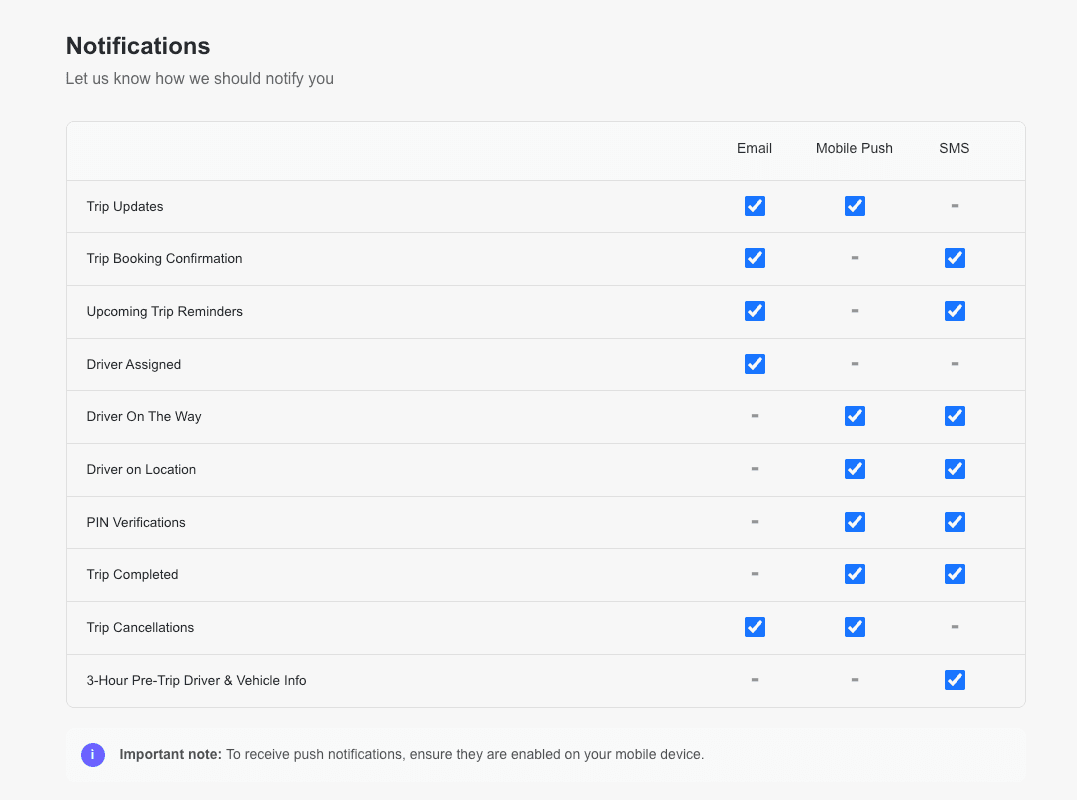
Use this guide to manage the trip Alerts sent to passengers by email, text (SMS), or app push notification, based on settings, covering booking confirmation, trip reminders, driver status, and cancellations. a passenger receives by SMS, email, or mobile push notification through the LUXY app. All notification channels are enabled by default and can be customized for each passenger profile.
To track your passenger's ride, see the Navigate the Rides Dashboard guide.
Steps
- Log into the LUXY Travel Agent Portal.
- Navigate to Passengers, then select the Edit icon for the passenger whose notification preferences you want to update.

Enable (check box) or disable (un-check box) notifications for each communication channel:
- SMS (text)
- Mobile Push (LUXY App)
Changes are saved automatically.