Overview
A corporate client can enroll your LUXY The company or business entity registered with LUXY. Individual bookers within the agency are Travel Agents. so you can book rides on its behalf.
Once connected, you can book and edit rides for the corporate account. Corporate users can view rides booked by your agency, but only your agency can edit those rides. Passengers cannot view ride pricing, and you continue to earn The percentage of a booking’s fare earned by a travel agenct for eligible bookings made through their travel agency account. Commissions are paid to the agency according to LUXY’s payout schedule. on eligible rides.
The connected Travel Agency and corporate accounts mirror shared passenger information and notification preferences. Updates made in one account are reflected in the other.
Already have a LUXY Travel Agent account?
- Your corporate client finds your agency in the A corporate account user who books and manages rides on behalf of their company through the Corporate Concierge Portal. platform under Travel Agency >> Available Travel Agencies and toggle on Enroll.
- The corporate client selects the vehicle types your agency is authorized to book.
- Once enrollment is complete, log into the LUXY Travel Agent Portal and begin booking rides for the corporate account. See Book a Ride.
Don't have a LUXY Travel Agent account?
- The corporate client will invite your agency via email to join LUXY. Find the invitation email and select Register Your Company.
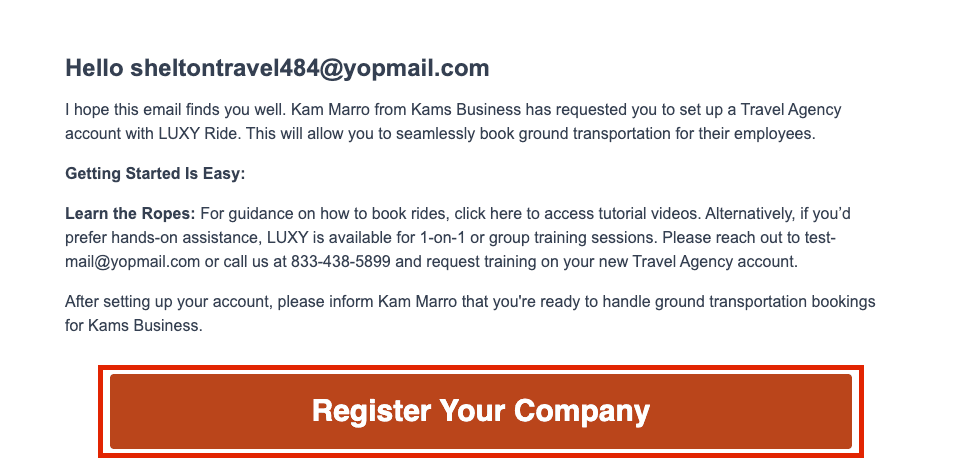
- To complete registration, create your LUXY travel agency account.
- Your corporate client finds your agency in the concierge platform under Travel Agency >> Available Travel Agencies and toggle on Enroll.
- The corporate client selects the vehicle types your agency is authorized to book.
- Once enrollment is complete, log into the LUXY Travel Agent Portal and begin booking rides for the corporate account. See Book a Ride.